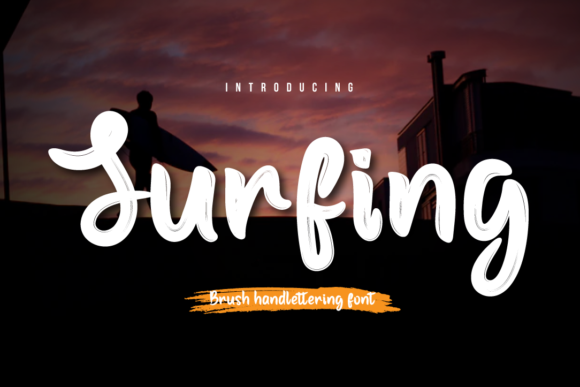
Surfing: A Handwritten Font for Modern Web Design and Digital Branding
Choosing the Right Font for a Creative Portfolio Homepage
While working on a portfolio homepage for a lifestyle photographer, I wanted a font that felt personal yet professional. The layout needed a hero section with a bold headline over a full-width image banner. I tried a few script fonts but kept coming back to Surfing—a brush handwritten font that brought a sense of movement and warmth to the design.
What Makes Surfing Stand Out?
Surfing is part of the Script Amp category, designed to mimic natural handwriting with soft strokes and slight imperfections. It’s not overly casual like a chalk or marker font, nor is it too formal like a classic calligraphy typeface. Instead, it lands somewhere in between—modern, expressive, and versatile enough for digital use.
When previewing the font in the hero section, I noticed how well it balanced with a clean sans serif body font. The contrast helped establish a clear visual hierarchy, drawing attention to the headline without overwhelming the supporting text. This is key for web usability and content scanning behavior.
Where to Use Surfing in Web Design
Surfing works best in short bursts—headers, call-to-action buttons, logo text, and decorative accents. It’s not ideal for long paragraphs or body copy, but that’s expected with most script fonts. Here are some effective uses I’ve tested:
- Hero Titles: Paired with a soft beach photo, Surfing gave the homepage a relaxed, authentic feel.
- Call-to-Action Buttons: Used sparingly on a “Book a Session” button, it added a human touch without sacrificing readability.
- Logo Text: For a boutique coaching brand, I used Surfing as the main logo typeface, giving it a warm, approachable identity.
- Social Media Graphics: Exported as a web-safe image, it looked great on Instagram story templates and Pinterest pins.
Testing Readability Across Devices
I always check how a font performs on mobile. With Surfing, legibility at smaller sizes was limited, so I reserved it for large headers and image overlays. On mobile, I adjusted the font size and letter spacing to ensure it remained clear without becoming pixelated.
For dark backgrounds, I used a light stroke or white outline to maintain contrast. On light banners, a subtle drop shadow helped the text stand out. These small tweaks are essential for accessibility and user engagement.
Font Pairing for Web Design Success
One of the most important aspects of using a decorative font like Surfing is knowing how to pair it with more functional typefaces. In the portfolio homepage, I used Surfing for the main headline and a simple sans serif for the body text and navigation menu.
This contrast created a modern editorial feel. For a product landing page I built recently, I paired Surfing with a serif font for subheadings and a clean monospace font for code snippets—keeping the layout dynamic but cohesive.
What to Check Before Using Surfing on the Web
Before embedding any font into a live site, I make sure to verify the following:
- Webfont Availability: Surfing needs to be available through a reliable font service or be self-hosted with proper licensing.
- File Formats: Check for WOFF2, WOFF, and TTF support to ensure cross-browser compatibility.
- Alternate Styles: See if the font includes uppercase, lowercase, and stylistic alternates for more design flexibility.
- Licensing: Confirm that the font allows commercial use, especially for client projects or online stores.
- Multilingual Support: If the site serves international audiences, verify character set coverage.
Real-World Use Case: A Boutique Coaching Website
On a recent project for a mindfulness coach, I used Surfing in the hero section and logo design. The brand needed to feel calming and approachable, and the font’s flowing lines helped reinforce that message.
Since the homepage had a full-screen video background, I placed the headline over a semi-transparent overlay to ensure readability. I also tested the font on a dark mode version of the site and found that a slightly larger size and soft glow effect helped it stand out without straining the eyes.
Surfing for Branding and Marketing Assets
Beyond websites, Surfing works well in digital marketing materials. I’ve used it in email headers, social media carousels, and even branded PDFs. Its organic texture makes it feel more personal than a standard system font.
When building a digital brand kit for a wellness startup, I included Surfing as the primary script font. It complemented the minimalist sans serif used in the UI and helped differentiate the brand from more corporate competitors.
Final Thoughts on Using Surfing in Digital Design
If you're looking for a way to inject personality into your web projects without sacrificing usability, Surfing is a strong contender. It’s a script font that feels modern, human, and flexible enough for a variety of creative uses—from landing pages to logo design.
As with any decorative font, moderation is key. Use it where it adds value—headers, short phrases, branding elements—and pair it with more legible typefaces for body text. Always test it across devices and screen sizes to ensure it supports a polished, professional user experience.